Periods
Every journal writes one note per period, and a journal's period length is chosen once, when the journal is created, under I'll be writing. It cannot be changed afterwards — to write at a different length, add another journal.
| Period | One note per |
|---|---|
| daily | day |
| weekly | week, starting on the day Week configuration sets |
| monthly | calendar month |
| quarterly | calendar quarter — January to March, April to June, and so on |
| annually | calendar year — commands call it Yearly note |
| Custom intervals | a run of days, weeks, months, quarters or years you choose, such as two weeks |
How a note knows its period
A journal note records its period by the period's first day, in the date property (journal-date unless you renamed it). A monthly note for March 2026 carries 2026-03-01; a weekly note carries the first day of its week. The plugin reads a note's period from that date, so a note whose date is not the first day of a period of its journal is not recognized as that journal's note.
When you create or connect a note for any date, the plugin works out which period that date falls in and uses the period's first day. A daily date given to a weekly journal lands on that date's week.
Weeks
Which day a week starts on, and which week is week 1 of the year, come from Week configuration on the main settings page, which also decides week numbers. Change opens the choices:
- Follow system locale — uses the week settings defined by Obsidian's current locale.
- ISO 8601 — week starts on Monday; the first week of the year is the one containing the first Thursday (Jan 4th).
- Western traditional — week starts on Sunday; the first week of the year is the one containing the first Saturday (Jan 1st).
- Middle Eastern — week starts on Saturday; the first week of the year is the one containing the first Friday (Jan 1st).
- Custom — pick Start week on, and First week of year: the day of January (1–7) that the first week of the year must contain — 4 means the first week is the one containing Jan 4.
With anything but Follow system locale, Apply week configuration to all dates in vault appears: off, week-configuration settings apply only to dates inside journals and do not affect dates created by other plugins or Obsidian itself. You might need to restart Obsidian for it to take effect.
Two more rows of the same block set defaults explained elsewhere: Default week numbers, where the week-number column sits in calendar blocks left on Use global default — see Month calendar and Week calendar — and Default timeline navigation, whether a calendar-timeline block shows previous and next controls unless its own navigation option says otherwise — see Timeline.
Changing it when you already have weekly notes
Weekly notes keep their week number, but their dates change. When you Update, every weekly note — and every notelet in one of those weeks — has its date rewritten to the first day of the same-numbered week under the new configuration, so your calendar keeps showing them.
Two things can stop a note being moved, and a notice counts them — "3 weekly notes could not be updated to the new week configuration.":
- the note's file could not be written;
- the new configuration makes a year one week shorter, so two old weeks land on the same new week. The first keeps the week; the other keeps its old date, and is no longer shown until you move it.
Example: Changing the week configuration.
Week numbers in names
A weekly journal's name template usually shows a week number. Use w in the format, which follows Week configuration. W is always ISO week numbering, and the settings page warns when a format uses it: "You use W to format weeks, which does not respect custom week settings and may show a different week number than the Calendar view."
For a week that straddles New Year, {{date}} on a weekly journal is a day inside the week chosen so that year tokens match the week's own year — its representative day: under ISO 8601, {{date:YYYY-[W]ww}} names the week starting 29 December 2025 2026-W01. Use {{start_date}} when you want the week's actual first day.
Example: A week across New Year.
Custom intervals
A custom interval journal writes one note per run of a fixed length — Every a number of days, weeks, months, quarters or years — counted from its Start date, which cannot be changed after creating the journal.
- Intervals repeat back to back from the start date, in both directions.
- Month, quarter and year intervals keep the start date's day of the month. Intervals that start on the 31st start on the last day of shorter months, and return to the 31st when a month has one.
- A new custom interval journal names its notes
{{journal_name}} {{index}}—Sprint 1,Sprint 2— using sequential numbers. - In interval lists, each interval is drawn with the journal's Calendar interval lines.
Example: Numbered sprints.
Making one interval longer or shorter
A single interval can run longer or shorter than the rest. Edit the note's end date property (journal-end-date unless you renamed it) by hand; the change takes effect straight away.
Either way, the next interval starts the day after the new end. What happens after that depends on the unit the journal counts in:
- Days or weeks — the schedule moves. Every later interval starts a whole interval after the one before it, so all of them shift by the change. Intervals before the Start date are the exception: they hold like months do, because the start date always begins an interval. The interval after the edited one runs up to the next regular start date.
- Months, quarters or years — the schedule holds. The interval after the edited one runs only up to the next regular start date, and every interval after that is where it always was. Shortening a monthly interval to the 20th, for example, gives a short interval from the 21st to the end of the month.
An interval whose end differs from its usual length keeps its end date property even when Add end date property is off.
Example: Shortening an interval.
Things periods do not do
- One note for the longest period that covers a day. A journal cannot decide, day by day, whether to write a daily, weekly or monthly note. Each journal writes at its own length. Zoom out and Zoom in move between the journals of different lengths from the note you have open — see Commands.
- Decades. The date picker and Notes by date can show a decade, but no journal writes one note per decade. To file notes by decade, put
{{date<startOf=decade>:YYYY}}in a journal's folder — see Filing notes by decade.
Examples
Numbered sprints
A custom interval journal named Sprint: Every 2 weeks from Start date 1 February 2026, Note name template {{journal_name}} {{index}}, and sequential numbers starting at 1. Its first two notes:
| Note | Runs | journal-index |
|---|---|---|
Sprint 1.md | 1 – 14 February | 1 |
Sprint 2.md | 15 – 28 February | 2 |
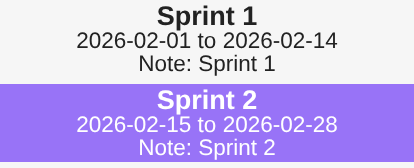
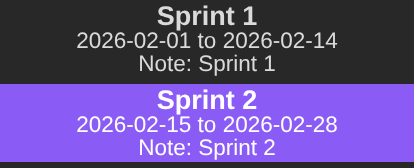
A view with a Custom intervals block, Window Selected month, lists both. The journal's Calendar interval lines here are {{journal_name}} {{index}}, {{start_date}} to {{end_date}} and Note: {{note_name}}, and the open note is highlighted:
Changing the week configuration
A weekly journal with Folder week and Default date format YYYY-[W]ww, under ISO 8601, has three notes. Changing Week configuration to Western traditional and pressing Update:
| Note | Date before | Date after |
|---|---|---|
week/2026-W23.md | 2026-06-01 | 2026-05-31 |
week/2026-W53.md | 2026-12-28 | 2026-12-27 |
week/2027-W01.md | 2027-01-04 | 2027-01-04 — not moved |
Under the new configuration the two notes around New Year land on the same week. 2026-W53 takes it, 2027-W01 keeps its old date, and the notice reads "1 weekly note could not be updated to the new week configuration."
Shortening an interval
Two custom interval journals: sprint, Every 2 weeks from 5 January 2026, and monthly, Every 1 month from 1 January 2026. Each has its first interval's end date edited earlier by hand:
| Journal | Edited interval | Next interval | The one after |
|---|---|---|---|
sprint | 5 – 10 January (was 5 – 18) | 11 – 24 January | 25 January – 7 February |
monthly | 1 – 20 January (was 1 – 31) | 21 – 31 January | 1 – 28 February |
The two-week schedule moves earlier by the eight days removed; the monthly one is back on the 1st after one short interval.
A week across New Year
A weekly journal under ISO 8601 with Note name template {{date:YYYY-[W]ww}}:
| Opened for | Note | Week starts |
|---|---|---|
| 29 December 2025 | 2026-W01 | 29 December 2025 |
| 28 December 2026 | 2026-W53 | 28 December 2026 |
| 4 January 2027 | 2027-W01 | 4 January 2027 |